Recommendations from your network

Find the right people
in your network.

Need an electrician, a photographer or a tax advisor? Just describe what you need help with. WhoKnows shows you the right people from your own and extended network.

Coming soon toApp Store Coming soon toGoogle Play
  • Free
  • iPhone & Android
  • Only with your consent

WhoKnows is an app that helps you find service providers, experts and other helpful contacts through your personal network.

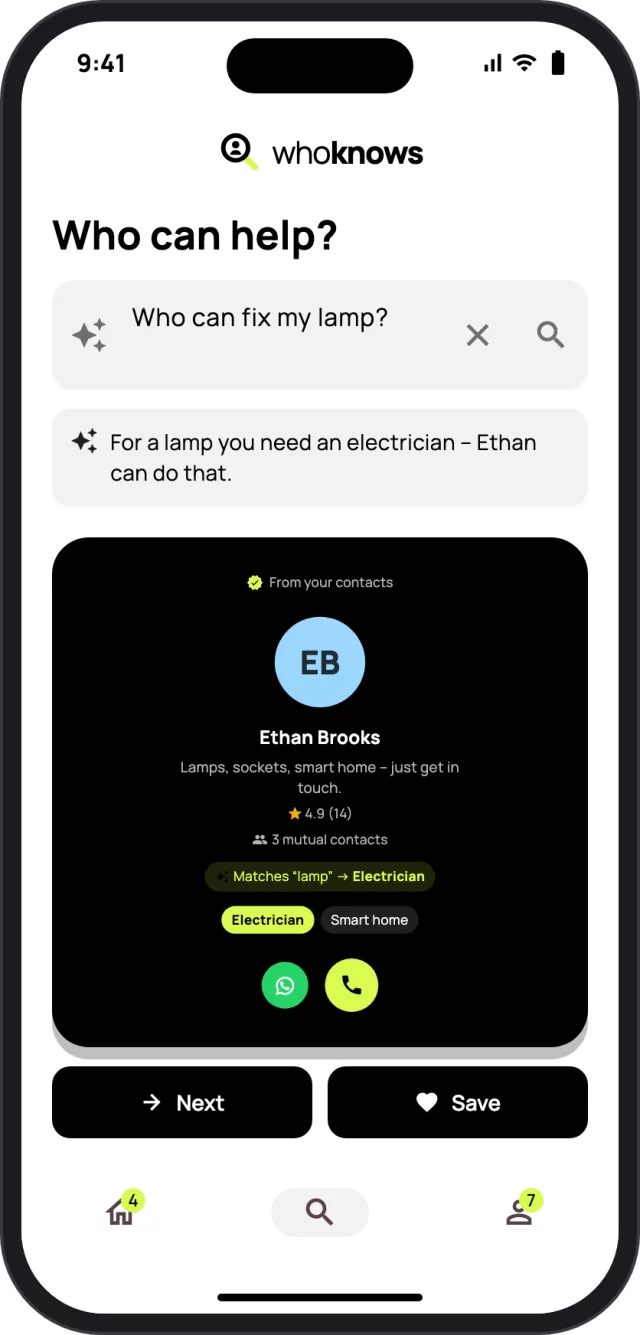
Search in WhoKnows: “Who can fix my lamp?” finds the electrician Ethan from your contacts. WhoKnows home screen with news from your contacts.

You probably already know someone.

You need an electrician. A photographer. Help with your taxes.

So you ask in five WhatsApp groups or search Google for strangers.

Yet the right person may already be in your network.

WhoKnows shows you who can do what.

How it works

  1. See who you already know

    WhoKnows shows you who from your address book is already on board and what they can do – without names or numbers ever leaving your phone in plain text.

  2. Say what you need

    Just type “Who can fix my lamp?”. WhoKnows understands that you’re looking for an electrician.

  3. Get in touch

    Call or message via WhatsApp or text – someone you know instead of a stranger.

What that looks like in real life

One example, from question to help.

  1. Your new ceiling lamp should finally go up. You need an electrician.

  2. You type into WhoKnows: “Who can fix my lamp?”

  3. WhoKnows finds Ethan. He’s one of your contacts – you just never knew he’s an electrician.

  4. Anna knows you both and gave Ethan five stars: “Quick, tidy, super friendly.”

  5. You message Ethan directly on WhatsApp. By the weekend, the lamp is up.

Everything your network can do – in one app

More than 100 professions and talents, from trades to taxes.

01

What do your contacts do?

See at a glance who from your address book is on WhoKnows and what they can do: electrician, tax advisor, photographer, web developer and much more.

  • News when someone joins or adds a new skill
  • Matching people for what you’re looking for
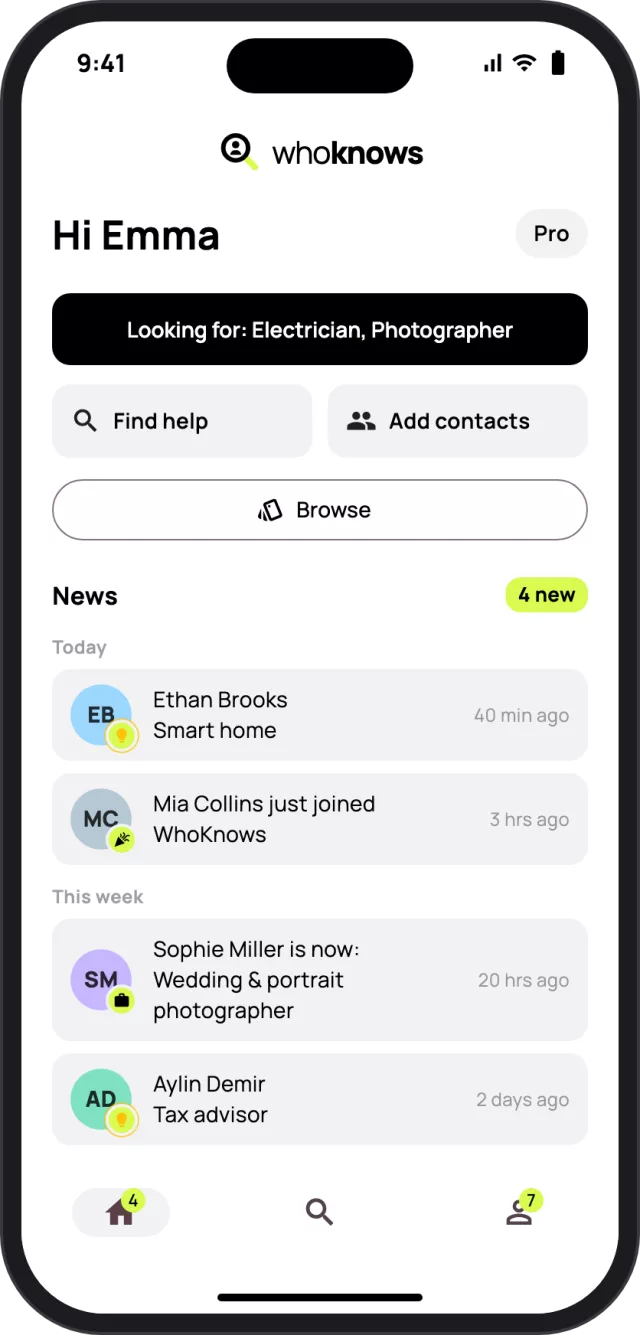
Home screen with news: Ethan now does smart home, Mia just joined WhoKnows.
02

Just say what you need help with

Describe what you’re looking for in your own words. WhoKnows figures out which profession fits and shows you the right people from your network.

  • Search in your own words – in English or German
  • Shows why someone is a match
Search “Who can fix my lamp?” with the result Ethan Brooks, electrician.
03

Discover what your network can do

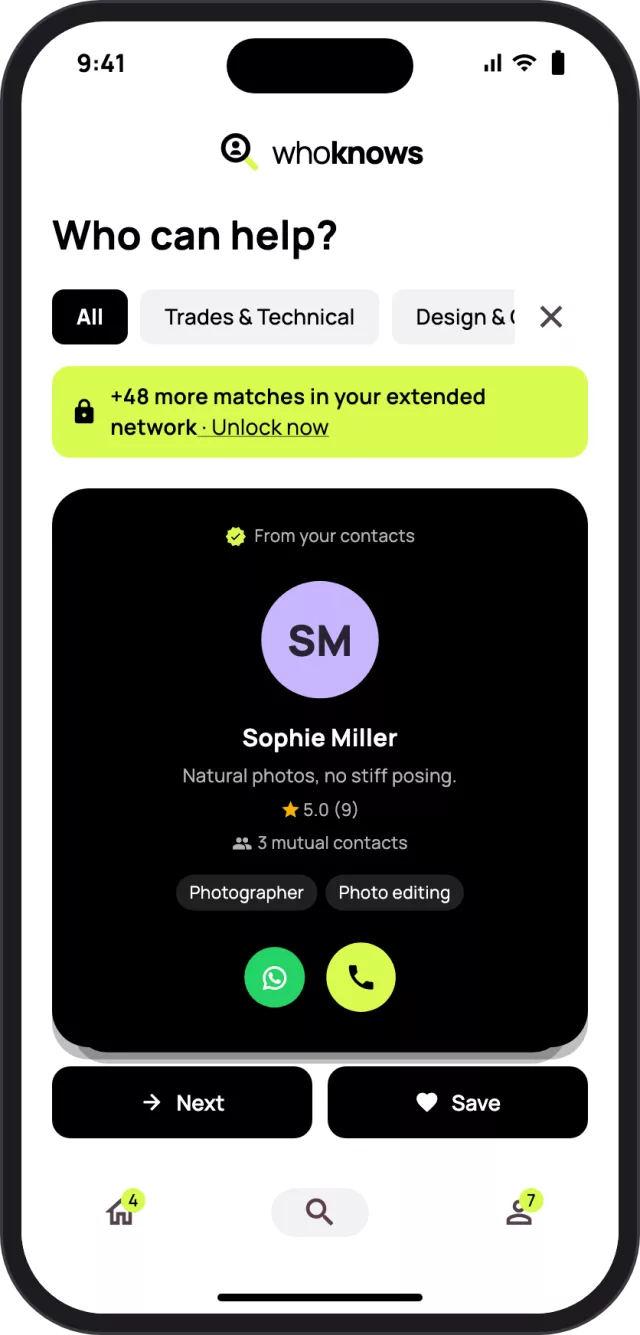
No specific plan? Swipe through the profiles in your network without a search term and filter by categories like trades, design or finance.

  • Save people you want to ask later
  • Categories from home & garden to IT
Browse: card of Sophie Miller, photographer, with categories to filter by.
04

Recommendations from people you know

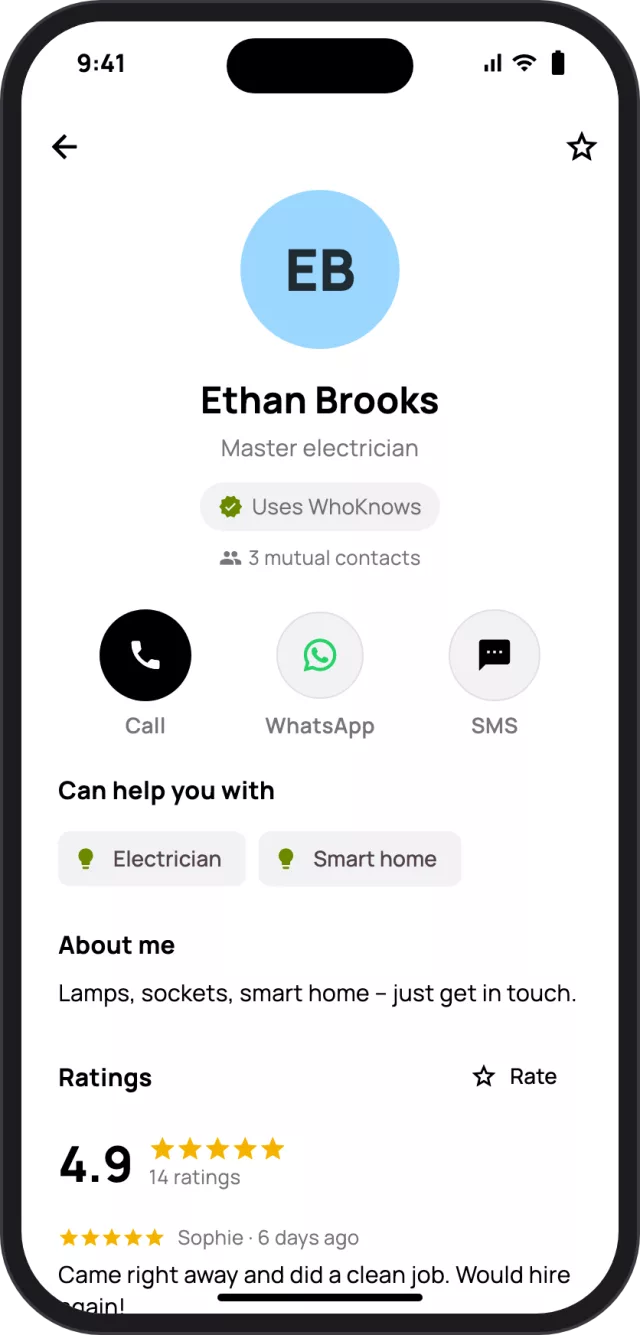
Ratings come from real contacts instead of anonymous strangers. Get in touch directly by phone, WhatsApp or text.

  • Stars and comments from your circle
  • Mutual contacts at a glance
Profile of Ethan Brooks with ratings from mutual contacts and buttons to call, WhatsApp or text.
05

Show what you can do

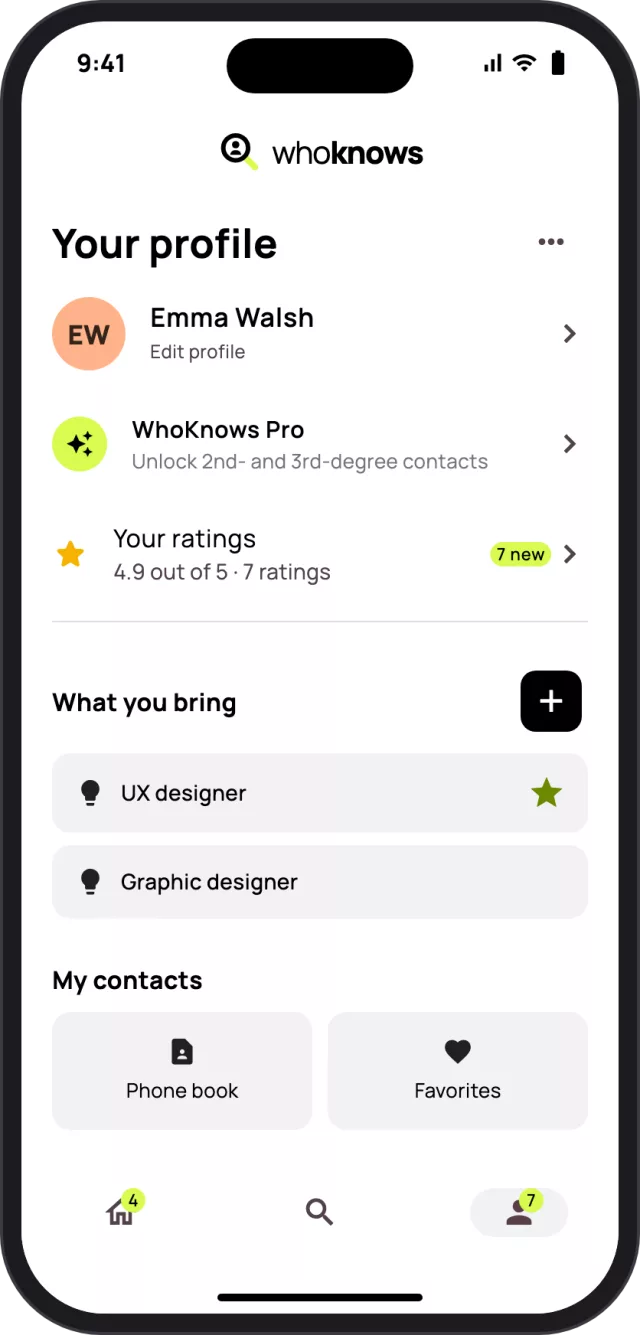
Add your skills and a few words about yourself. That way your contacts find you when they need help.

  • Skills from more than 100 professions
  • Say who you’re looking for yourself
Your own profile with the skills UX designer and graphic designer.

Who needs to use WhoKnows?

To find someone, that person has to be on WhoKnows – but not your whole address book. A few contacts are enough, because each of them brings their own network.

Who will I see?

Everyone from your address book who uses WhoKnows – with what they can do and ratings from your mutual contacts.

What about contacts without WhoKnows?

They get nothing from us – no texts, no invitations. We don’t even remember that they’re in your address book.

Can I invite them?

Yes, with one tap via WhatsApp, text, or as an image for your story or group chat. You decide who to invite.

How fast does my network grow?

Faster than you think: five friends who each have 20 contacts on WhoKnows bring you up to 100 people in the 2nd degree – and their contacts add the 3rd degree.

What if I’m brand new?

You immediately see who from your address book is already on board and how many more people there are in your extended network. If nobody’s there yet, you invite the first people right from the app.

Your network is bigger than you think

You know Lisa. Lisa knows Tom. Tom is an electrician. Tom is your 2nd degree contact.

For free, you see that there are people in your extended network who can help. With WhoKnows Pro you see that it’s Tom – and that Lisa can connect you. One tap asks Lisa for an introduction. This works up to the 3rd degree.

Free

€0 forever

  • Your contacts and what they do
  • Search in your own words and browse
  • Ratings and your own profile
Popular

Pro

€3.99 per month

  • 2nd and 3rd degree contacts
  • See who connects you
  • Ask for an introduction with one tap
  • Cancel anytime

Pro Lifetime

€19.99 one-time

  • Everything in Pro
  • Pay once, Pro forever

Prices in Germany incl. VAT; prices in other countries are shown in the store. Purchases and subscriptions are handled by the App Store or Google Play.

Your data stays yours

WhoKnows is built on trust within your network. That’s why you decide who sees what about you.

Checksums only

Numbers and email addresses from your address book are turned into checksums (SHA-256) on your device. We never receive names or plain-text numbers.

You decide who sees you

Your direct contacts see you – they already have your number. Contacts of your contacts only see your name, photo and number if you allow it.

No ads, no tracking

We don’t show ads and don’t sell data. You can delete your account anytime, right in the app.

Read the privacy policy →

Frequently asked questions

What is WhoKnows?

WhoKnows is a networking and recommendation app for iPhone and Android. Users describe what they need help with, and WhoKnows finds the right people from their own or extended personal network – from electricians to tax advisors.

What’s the point if only a few of my contacts are on WhoKnows?

A few are enough, because each contact brings their own network. For free, you see how many more people are in your extended network; with WhoKnows Pro you also see who they are. You can invite contacts without WhoKnows with one tap via WhatsApp or text.

How much does WhoKnows cost?

WhoKnows is free. If you also want to find 2nd and 3rd degree contacts, you can add WhoKnows Pro for €3.99 a month or €19.99 once.

Who can see my profile?

Your direct contacts – people who have your number or email address in their address book. Contacts of your contacts only see your name, photo and number if you allow it under Profile → Privacy. Otherwise they only see your skills and can reach out to you through your mutual contact.

Does WhoKnows upload my address book?

No. Phone numbers and email addresses are turned into checksums right on your phone. Our server only compares these checksums and remembers which WhoKnows users are in your address book – nothing about your other contacts.

Do I have to allow access to my contacts?

No, it’s optional. Without access, however, WhoKnows can’t show you who from your circle is on board. You can change the permission anytime in your phone’s settings.

How does searching in my own words work?

You write what you need help with, and WhoKnows maps it to the right professions – “my tap is leaking” becomes plumber, for example. We use AI for this; it only receives your search text and profession names, no names or contact details.

What do 2nd and 3rd degree mean?

1st degree are your own contacts. 2nd degree are the contacts of your contacts, and 3rd degree are their contacts. Example: you know Lisa and Lisa knows Tom – so Tom is your 2nd degree contact. With Pro you see who connects you and can ask for an introduction.

Can I offer help myself?

Of course. Add what you can do to your profile – for work or in your free time. Then your contacts find you when they’re looking for exactly that.

How do I delete my account?

Right in the app under Profile → ⋯ → Delete account. All steps and what gets deleted are explained here.

Find out who in your network can help

Free for iPhone and Android, in English and German.

Coming soon toApp Store Coming soon toGoogle Play